
Proud Platform Partner
Sierra Interactive lead follow-up system, done for you BluPrint for Sierra Interactive.
A complete lead management system built inside your Sierra Interactive account, with smart filters, action plans, behavioral automations, and tagging, installed and tuned to how you work.
Built by Sierra Interactive's most active partner

See It In Action
Watch BluPrint in action.
A quick walkthrough of how Sierra users streamline follow-up and organize their pipeline with BluPrint.
What You Get
Everything Sierra Interactive can do, built out for you.
We deploy a complete operating system into your Sierra account. Here's what's inside.
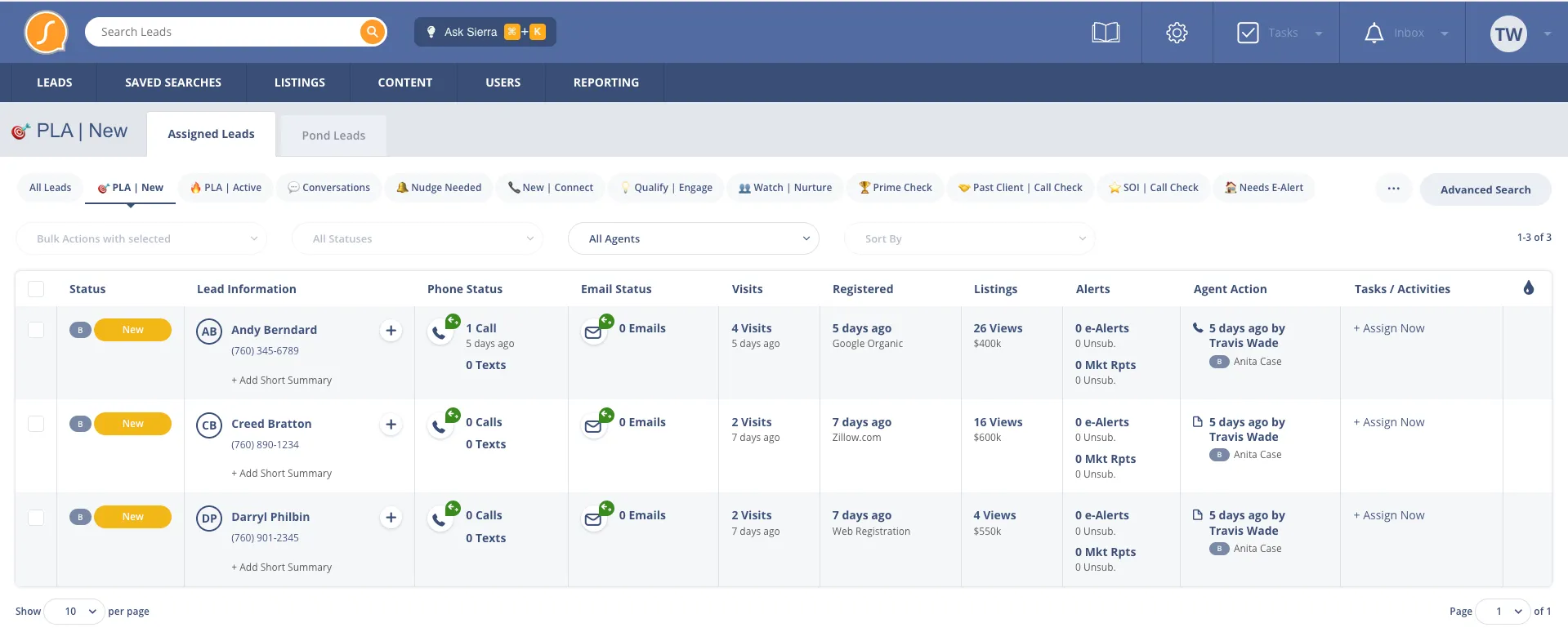
- Pre-built smart filters that surface the right leads at the right time
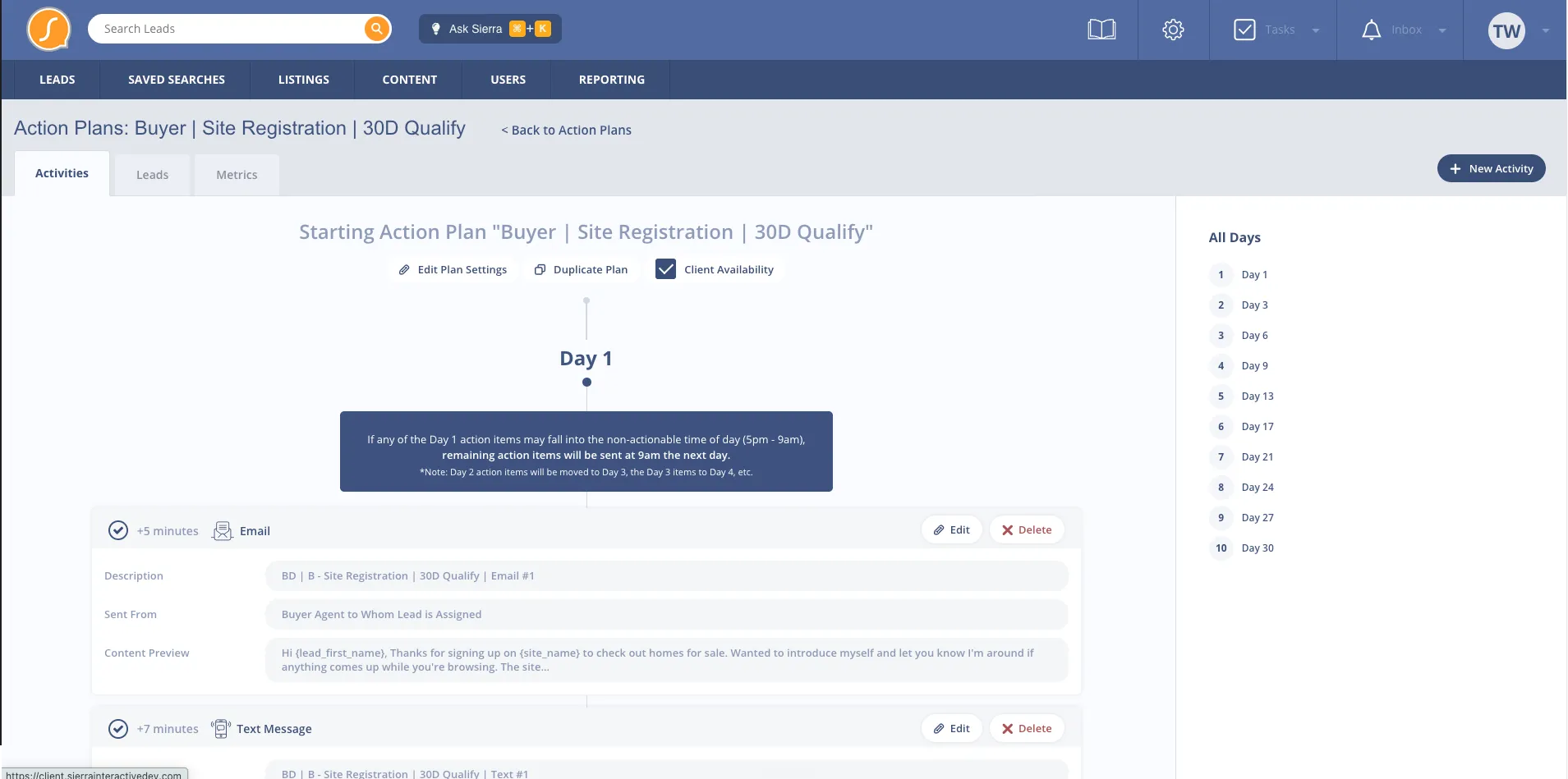
- Behavioral action plans built around real estate buyer and seller patterns
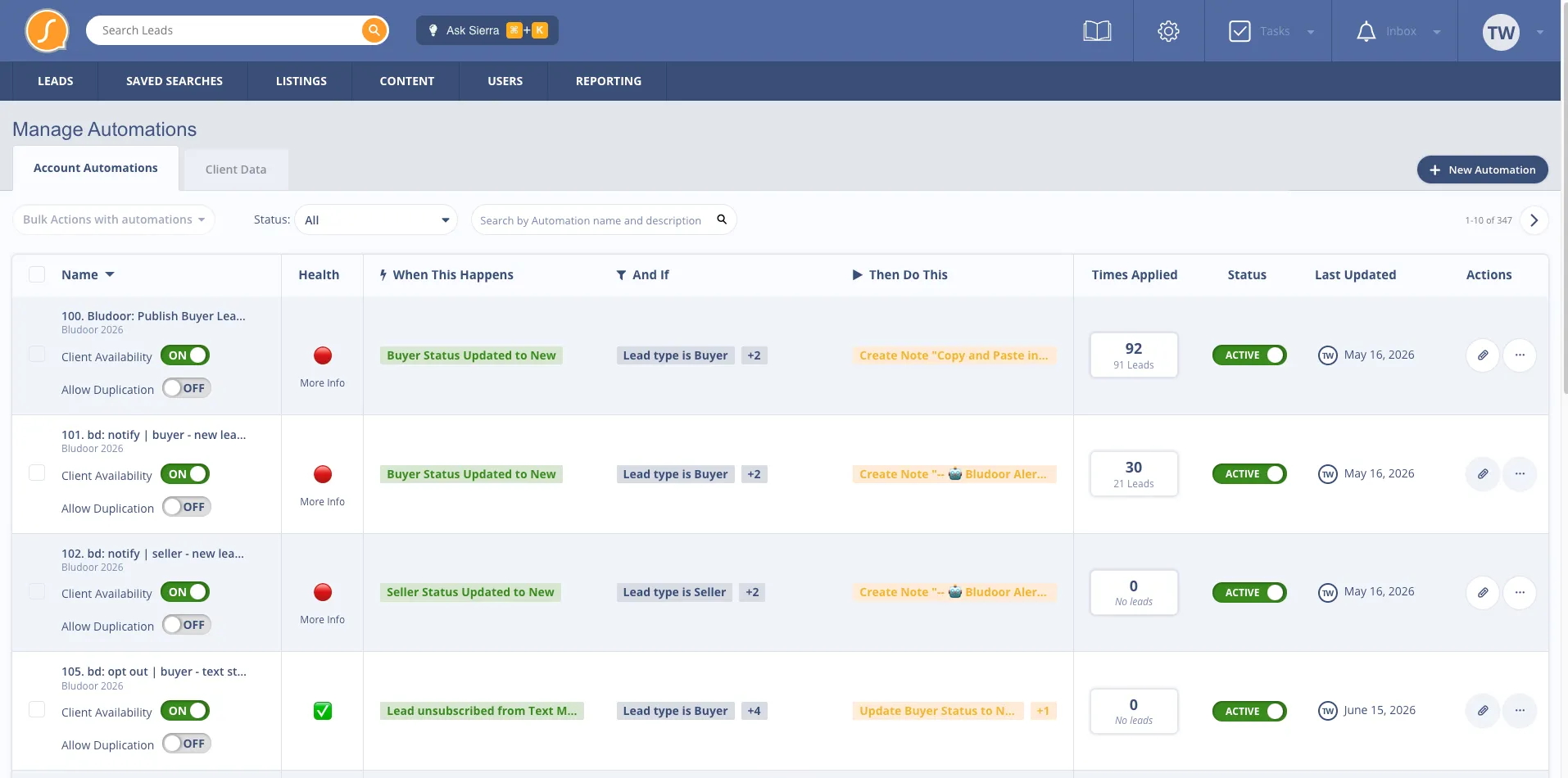
- Automated tagging system tied to lead behavior and engagement
- Email and text template library mapped to every stage of the pipeline
- Integration with Fello, RealScout, and other Sierra-compatible tools
- Full onboarding and training
Behavioral Automations
Built around behavior, not timelines.
Most Sierra setups run on basic time-based drip campaigns. Bludoor builds automations triggered by what leads actually do: site visits, property saves, alert engagement, and response patterns. The system reacts to real behavior, so your follow-up is always timely and relevant.
How It Works
Live in about two weeks. Supported long after.
Built for you. Hands-on training. Ongoing support.
- 01
We install your system
Once your account is connected, the install usually takes less than 24 hours. We deploy the complete Bludoor system into your Sierra Interactive account: smart filters, action plans, automations, tags, templates.
- 02
We train you and your agents
We onboard your agents and admins on how the new system works, what each filter and plan does, and how to use them day to day. Live training sessions and documentation included.
- 03
We stay involved
After launch, we tune the system based on how you actually use it. Ongoing support, refinements, and updates as Sierra evolves and best practices shift.
Setup costs, timeline, and who to hire:Sierra setup service
BlooIQ Dashboard
See what your Sierra system is actually doing.
Your Bludoor build comes with the BlooIQ Dashboard. Lead status movement, conversation rates, database health, all in one place, updated in real time.
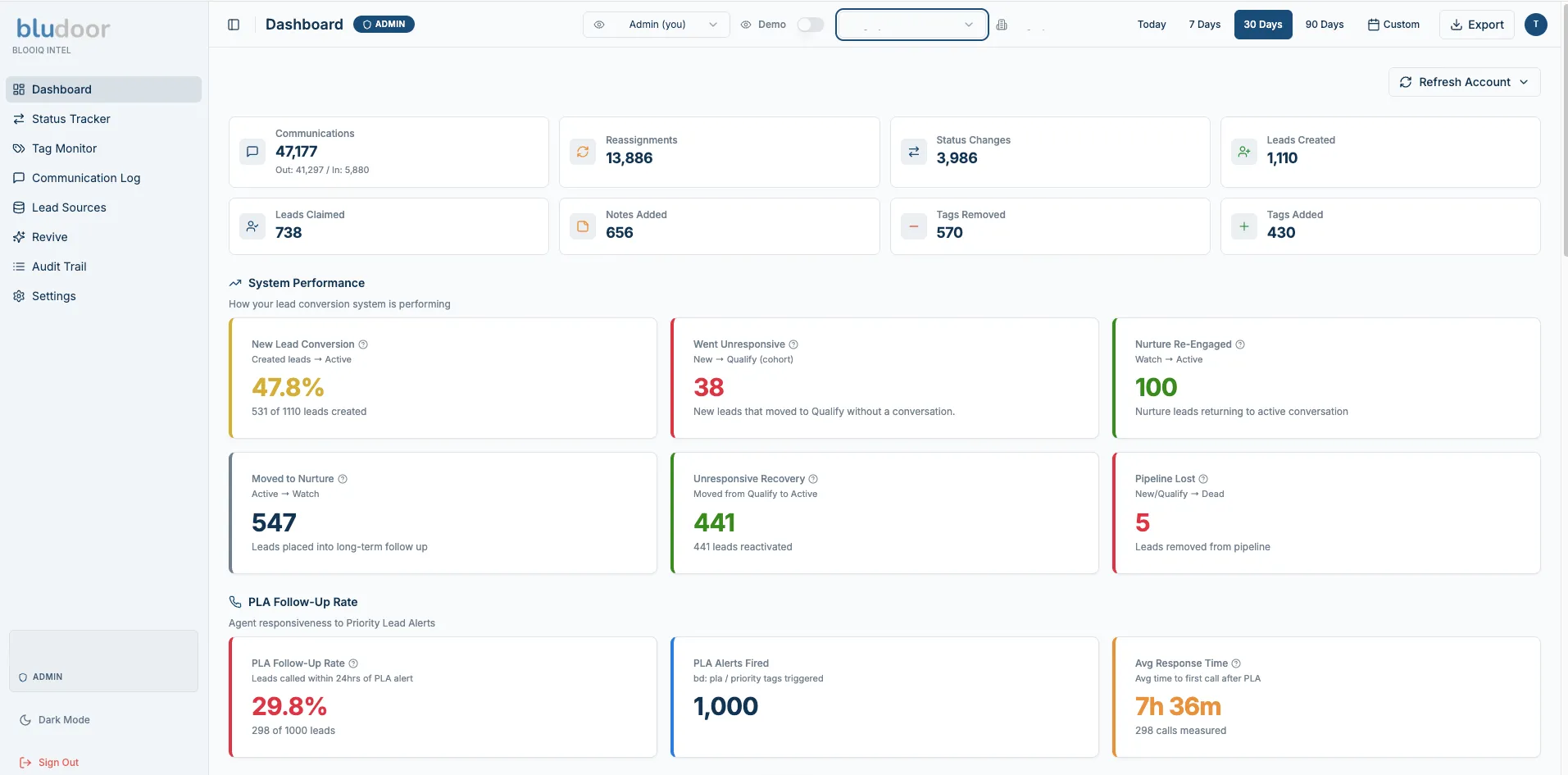
Most CRMs hand you raw data and leave you to figure out what it means. The BlooIQ Dashboard does the work for you. It shows what changed this period, what needs attention, and what is running healthy.
Every metric is in plain language. New lead conversion is healthy or it needs attention. Nurture is re-engaging or it is stalling. Communication is active or it has gone quiet. You stop guessing and start running your business on what the data is telling you.
Built for team leads, brokers, and admins who need to see how their database is performing without spending hours stitching reports together.
- Real-time performance dashboard with plain-language status indicators
- Status movement, conversation rate, and activity breakdowns
- New lead conversion, nurture re-engagement, and follow-up tracking
- Database health distribution with status snapshots
- Monthly review delivered with context on what changed and why
Comparing AI texting options on Sierra?BlooIQ vs. Lead Engage
Pricing
Get your BluPrint.
One-time build. No monthly commitment.
BluPrint Foundation
- Complete lead management setup
- 200+ proven action plans
- Behavioral automations
- Email & text contact template library
- “Run the Day” smart filters
- Full onboarding & training
- Action plan updates every 30 to 60 days
- Ongoing support: training portal, biweekly office hours, support email
Two Ways to Work With Us
BluPrint Foundation
One-time$299One-time build.
A complete system built inside your CRM, shaped by years of real database work.
BlooIQ
MonthlyFrom$199/mo
Your database, worked every month by BlooIQ and your Bludoor database manager. Includes your BluPrint Foundation build.
Every Bludoor build includes the Bludoor resource library.
SOPs, training documentation, playbooks, and updates as Sierra evolves. We stay involved long after launch.
Add-ons
Optional add-ons.
Pond BluPrint
$249 one-time
- Organized lead distribution, every lead has a clear home
- Daily workflow structure, agents know exactly who to call
- Automated rotation, no lead sits idle indefinitely
- Built-in accountability, neglected leads return automatically
- Full broker & agent setup docs included
Also available as an add-on with BluPrint Foundation
Database Revival
Pricing based on database size. Turn your dormant database into active opportunities with strategic re-engagement campaigns.
Real agents. Real results.
Trusted by Sierra Interactive agents and teams.
What 500+ Sierra agents and teams say about working with Bludoor.
BluPrint FAQ
How BluPrint runs inside Sierra.
The questions agents and teams ask before they hand us the keys to their Sierra Interactive account.
How the system works
How does BluPrint keep our agents from stepping on automated messages?
Every lead has exactly one owner at any given moment. The system runs in three clear lanes, so there's never confusion over whose turn it is to make the next move.
- Automation drives (New, Qualify, Watch): The system works unqualified leads at scale with automated text and email plans.
- Your agent drives (Active, Prime): The moment a lead is ready for a real conversation, the automated texts step back completely. Your agent owns the cadence, the conversation, and the close.
- Nobody drives (Archived, Closed, Junk): Past clients, sphere, and bad data get sorted out of the active pipeline so your agents focus only on production.
What keeps our database from turning into a chaotic mess?
Automated lead flow. Every lead sorts into the right bucket on its own, based on behavior and how it's communicating. Your agents are protected from data overload because they only take over at the Active stage, which is exactly where the real qualifying conversations happen.
Lead engagement & nurturing
What happens to leads who tell us they aren't ready to buy for 6 to 12 months?
They stay warm automatically, without draining your agents' time. Tag a lead with their buying window and they route into a matched long-term nurture track.
To keep your agents out of the noise, the system scales how sensitive its alerts are. For a 3 to 6 month buyer, triggers are sensitive so an agent can jump in early. For a 12+ month buyer, it waits for a much stronger signal of intent before alerting anyone, keeping your focus where it counts.
How does the system handle a brand-new lead over their first 90 days?
Every new lead enters a pre-mapped 90-day lifecycle that blends automation and human follow-up.
- Days 0 to 30, the conversation window: Automated digital touches and agent calls work in tandem to earn a two-way reply.
- Days 31 to 60, behavioral re-engagement: Automation quietly tracks on-site activity and flags quiet-but-active leads the moment they show renewed intent.
- Days 61 to 90 and beyond, database protection: Unresponsive leads drop into a long-term nurture cadence. They stay warm and never get abandoned.
Speed-to-lead & daily productivity
How does the system alert agents when a lead suddenly gets hot?
Instantly, and from two directions at once. The moment a lead shows any of the six core buying signals (returning to the site, saving a property, viewing multiple listings, requesting info, clicking listing alerts, or requesting a showing), two things happen within seconds.
- Instant auto-engagement: A behavioral text and email fire out immediately.
- Instant agent routing: The lead jumps to the very top of the agent's call filter for a human follow-up.
Nobody has to sit and watch a dashboard for it to work.
Will my agents actually know what to do when they open their CRM each morning?
Yes, because their day is already built for them. Smart filters stack their leads in strict priority order, so they just work the list from the top down.
- PLA Active: Call the hottest leads first, the ones on the site right now saving properties or viewing listings.
- PLA New: Reach fresh opportunities in their peak interest window, days 1 to 7.
- Conversations: Follow up with leads already in an open dialogue.
- Nudge needed: Catch active leads going cold, no contact in 3+ days, before they slip.
- Prime check: Review your highest-value opportunities against the 7-day follow-up standard.
What happens to the hidden gaps, like a lead missing their search alerts?
The system includes 11 specialized filters built to catch what human memory forgets. From orphaned buyers missing property alerts to leads missing an action plan entirely, it surfaces pipeline gaps automatically, so your leadership team doesn't have to police them by hand.
Getting started
What's the exact deployment process for syncing BluPrint with my Sierra account?
Getting set up is simple. You give us access to your Sierra account, we deploy our pre-built system directly into it, usually in under 24 hours. There's no migration and nothing for you to install. Then we walk your agents through the new filters, action plans, and tags so they're comfortable from day one. Most accounts are fully live, with training done, in about two weeks.
Will installing BluPrint override my existing Action Plans, tags, or routing?
No. We build alongside what you already have, not on top of it. Nothing gets deleted or overwritten without your sign-off. Because Bludoor is a Sierra platform partner, once your account is connected and everything is enabled, we push a button and the whole system installs. Then we onboard and train your team. You stay in control of your account the whole way through.
Can I customize the pre-built templates without breaking the automations?
Absolutely. The templates are yours to edit, so swap in your voice, your market, and your offers. The automation logic lives in the action plans and triggers underneath, so changing the words in a text or email won't break the chain. We'll show you exactly what's safe to edit and what to leave alone, so you can make it sound like you with full confidence.
How does BluPrint work alongside tools like Fello, RealScout, Homebot, Ylopo, or SISU?
It doesn't interfere with any of them. If anything, it helps. We build Sierra into your command center and connect those tools into it, so the activity they generate actually gets used instead of sitting in separate dashboards. You get the full value of every tool you're already paying for, all working together inside Sierra.
Get Started
Ready to build your BluPrint?
Book a free discovery call. We'll walk through your current Sierra setup and what's possible.